Showing posts with label adobe connect. Show all posts

Thursday, 31 July 2014

LEARNZ - Backchannel Participation

I jumped into a LEARNZ fieldtrip this morning to check out their new Backchannel feature.

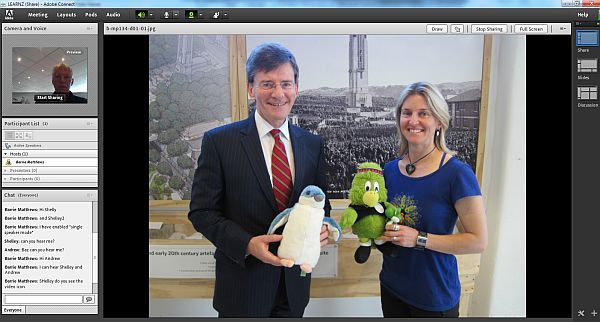
LEARNZ backchannel on Adobe ConnectAdobe Connect is being used to supplement the audio conferences from out in the field. This platform provides a space for visuals to be shared - such as pictures from the participating schools, from out in the field, and of the LEARNZ host & guest expert.
It also provides the opportunity for schools to experience more interactivity and opportunity to connect with each other through the chat feature. The audio conference itself is participated in by only one or two schools and is broadcast live out to other schools. This is a great way to enhance the LEARNZ virtual field trip in being able to bridge the 'virtual' with the 'reality' for students, being able to extend with a way to ask side questions, give contributions, feedback & additional resources like visuals & links to supporting materials. Yes the LEARNZ website can also do some of this, but the Adobe room brings this into the synchronous environment of the field trip.

I was really impressed with the quality of the audio, particularly as it was coming from a cellphone by the side of a river in Turangi! A feed is made from the audio conference direct into Mixlr where it is streamed live.

Mixlr was a find for me so signed up as i was listening. I can see how this might be really useful to some of our work in the VLN Primary School. We will be exploring how we can support collaborative groups of schools in participating together in LEARNZ activities, more to come on that later in the year.

There are still lots of great fieldtrips planned for the reminder of 2014 - get onboard with your students and participate!


Thursday, 26 May 2011

Hurry in for Adobe Connect Workshops

Adobe Connect is the tool we are using for our VLN Primary real time online classes. If you are interested in learning to use Adobe for online teaching, or professional learning you are welcome to register for these workshops.

Thursday, 24 March 2011

Cracking Adobe Connect

Finally i have worked out how to enable my students to be more active participants in our Adobe classroom without having to promote them with permissions that will allow them to ‘accidentally’ muck around with layouts & settings etc.

The secret is to assign individuals enhanced rights to only certain areas within the Adobe classroom – these can be turned on or off at any time – but need to be applied each time you come to class. Now they can write on the whiteboards, notes and upload files etc

Tuesday, 8 March 2011

VLN Primary Kicking Off for 2011

Things are ready to roll with the VLN Primary online classes for 2011. We are starting with confirmed classes this school term of Te Reo, Japanese, French, German & Astronomy. In the wings, to be confirmed and starting from next term will be Spanish, more Japanese & Te Reo classes, Gaelic & Electronics.

It is great to be continuing with a small but solid base of schools who collaborated last year and to welcome a growing number of schools to the VLN Primary community. I have been running Taster Classes the last couple of days (and on request for anyone interested in learning more). We have had quite a number of students from schools as diverse as Thorndon in the heart of Wellington city, to Kaingaroa a school in a lovely and remote Chatham Islands fishing settlement and smalls schools in the hill country of Eastern Taranaki.

Taster classes are designed to familiarise students with the online learning environment and iron out any technical problems schools may encounter when they connect, before they come into our scheduled classes. Students learn about the technology and they also learn how to communicate & interact with others in a way that is quite different from face to face classrooms. These classes allow schools to get an inside look into how online classrooms work before they decide to make a commitment to participate.

One of the students said ‘This is so cool, I can’t wait to start my class!’ Though i responded with a reality hit back to say, ‘Yes i hope you feel like this every week till you complete your class.’ I don’t want students and schools to be instantly hit by the WOW – novelty factor but understand this is an ongoing  commitment to learning. Even so, i was also thinking ‘Me too!’ Looking forward to teaching my class on Friday!

Tuesday, 1 February 2011

VLNC on EVO

The first VLN Community meeting of the year today, and i was able to join the VC through EVO.

evo

EVO is free to use, just register download the client app. put the IP number of the VC unit or bridge you want to connect to and you’re away! (The default is mute so don’t forget to unmute…)

This has been very convenient for me to access VC meetings without having to travel and find a VC room to accommodate me. The quality has been fine with the low bandwidth I have at the moment (.66 down, .47 up) but i don’t transmit video and use audio only. I have explored using Polycom PVX software or CMA server (hosted by AsNet) to join the VC bridge but i just can’t seem to get the network settings to work from home. They work OK from a SchoolZone school but defeats the whole purpose about being able to access the VC Bridge from anywhere. I am looking forward to the launch of Adobe V8 later this year which is said to have the capability of linking with H323 (this is the protocol used by NZEdVCNetwork). This will enable more of our schools to access some of learning opportunities that are currently only offered through the VC Network without the need for buying expensive VC equipment. (Though bandwidth will still be an issue for some of our schools – roll on RBI!!)

Here is a help sheet for using EVO to access VC.

Tuesday, 19 October 2010

Video Conferencing Technology Options

Many of the Secondary elearning clusters online classes are based on Video Conferencing between schools. Much of the VC equipment (in our cluster anyway) is now 8 years old - wow that must be over 100 in human years! It is really important for schools to have in their long term plans and budgets contingencies for the replacement of equipment. The following is an overview and comparison of VC solutions from the simple desktop through to HD VC.

Although VC is not the only way to connect learners online. In some ways i think VC can be a pedagogically unsound way to run classes as it is so easy to replicate the f2f transmission model of learning. Other options for online learning that schools can be looking at are the use of Adobe Connect for real time classes which has more functionality for the interactions of students and the further development and use of Web 2.0 tools and LMS classroom environments with a focus on putting the student at the centre of learning.

Thursday, 24 September 2009

C4 Student Connecting with Adobe

This is a crosspost from http://taranetc4.edublogs.org/ 

JeopardySt Mary’s students led today’s C4 VC. They were running a Jeopardy Quiz game they had created for the other students using Adobe Connect to host the Quiz & provide the communication medium for other students to respond with their answers to the Quiz.

Challenges were the ability to see the chat box (with incoming answers) while we were sharing our desktop. We overcame this by using two computers to manage the game. One which the QuizMaster controlled the game with and the other to manage the communications (our team of ‘adjudicators’).
Bandwidth was also a huge problem and reduced the fairness for all because of the varied response time. Coastal was the worst affected so we tried to balance this by allowing Coastal to contribute their answers through VC & making the Quiz available on VC as well as Adobe Connect.
It was lots of fun & a great example of student driven learning – once i had help them set up on the technical side of things it was a ‘teacher free zone’ and they were away laughing (literally).

c4SMS

Thursday, 6 August 2009

TaraMaths Quizz

DSC01314

Today students from 5 TaraNet schools competed in our TaraNet Junior Maths Quiz. We structured it a little differently this year by having the Quiz running through Adobe Connect to allow students to continue to look at the questions online while they were jumping in on the VC to answer the questions. Of course you could run it completely through Adobe without any VC but is good to see and talk to each other. Although I tried to keep it firmly structured with maintaining everybody on mute unless they were chosen as first in to answer a question, it soon became like trying to ref a rugby game as some endsites didn’t adhere to this & were trying to come in over top of each other. The students were really competitive & i can understand their frustrations at being ‘beaten to the buzzer’. Improvements for next year will be that the answers will be submitted over Adobe Connect using the chat box – this will keep a clear record of who is getting in first & clarify any answers missed. We had one contentious question, thanks Justine our adjudicator for picking this up, unfortunately this one question made a difference to the placings which were very close. It’s lots of fun to be involved in these events & would like to branch out into other areas (maybe current events) & it would be good to have our teams compete against schools in other clusters too. If you have any ideas for quizzes, or would like to join a challenge, let me know.

The winners this year were Stratford High – well done!

Friday, 29 May 2009

Learning Languages

image Today I had the privilege of watching Jarred teach French with his Year 7 & 8 students online. Jarred usually has two other schools (though only one today) linking in through audio conference and Adobe Connect. This is the beginnings of a pilot trialling this technology & collaboration between Primary schools. Learning Languages now has an increased focus in schools with the development of it’s own area in the new Curriculum and this type of opportunity has the potential to support schools (especially smaller rural schools) to deliver a wider choice of languages to our students. Jarred’s is the first class to work in this way and though Jarred is not a French expert he was confident to try out teaching in this environment so has been a great role model for others involved in this project. If your school would like to be involved and has a language expert (or any teacher with basic competency in a language) to contribute to this project, in return for their own student’s involvement in classes then contact Matapu School to find out more.

Thursday, 6 November 2008

Adobe Connect

image

Video Conferencing is not the only way we can provide synchronous online classes or collaborate with our colleagues online. Adobe Connect is a web conferencing tool that the SILC (Southland) cluster uses for all their online classes and that many of us are using to work with others online. You may have seen this used in SchoolZone or eAdmin training before.
The screen shot above shows us sharing desktops which can produce this never ending mirror effect ;-)
If you want to have a look at how this web based collaborative environment might work you can visit my Adobe 'sandpit' and see. If you want access to use this tool for your online learners contact Eddie

Friday, 14 March 2008

Adobe Connect

I did a little PD session today on using the meeting feature of Adobe Connect (formerly Breeze). It was hosted by the Adobe Connect User Group Asia Pacific.
ELearning schools have the opportunity to use Breeze to support the delivery of their online classes. Just ask Eddie.
I can really see the potential of this for our classes - VC is not the only technology we can be using. I would also like to use it for facilitating PD sessions with our teachers.
You don't need any special software just a web browser and a fast connection and your away!
This PD session was recorded and can be viewed here.