Makes you rethink doesn't it? How many passworded logins would the 'average' person use?
What web activity does the 'average' person engage in? Would be interesting to know (if there is such thing as an average person).

Professional reflections on education in NZ - Dancing on the shifting carpet
Showing posts with label netsafety. Show all posts
Showing posts with label netsafety. Show all posts
Wednesday, 10 August 2011



Tuesday, 23 March 2010
Safe Social Networking with Smokescreen

“Smokescreen game guides teenagers through dangers of social networking”
Learning about safe social networking through scenarios & simulation inside an interactive game designed as a social network site ‘White Smoke’. What is different and very effective about this cybersafety/digital citizenship game is the immersive nature of being inside the social network and interacting with the characters in the scenarios and actively having to seek out through the maze that is a social network to find out what is really going on.
This is a good one – send your kids there. http://www.smokescreengame.com (Most suitable for teenagers.)
Monday, 12 October 2009
Blogging Guidelines for Schools
“The purpose of this document is to assist schools in developing a policy for the safe and educationally appropriate use of web-logs or blogs.
Although the document addresses blogs specifically, the concepts can be applied to the use of a variety of read/write web tools designed to facilitate communication, commonly called Web2.0
- Why use a school blog
- Establishing an educational blog
- Monitoring and managing the school blog?
- Privacy and copyright
- Platforms and tools
- Discussion questions for your school”
You have until the end of the week to share in the shaping of these guidelines for schools. Many schools have closed the opportunities of Web 2.0 to their students because they are unsure of how to manage what is potentially a disruptive technology. These guidelines will be an important resource for schools as more and more they allow their students to safely step out into the Wide Wonderful World of Web 2.0.

Monday, 21 September 2009
Keeping up with our Kids Online
Netsafety Parents
Recently I spoke with parents at Matapu School about NetSafety. My presentation was in support of the staff as they shared what was happening with elearning in their school. The presentation itself is pretty simple bullet-pointed ideas (feel free to download, adapt & use) but it is more of a discussion guide & what is really important is getting families talking about their safe & appropriate use of the internet – not just at school but at home too.
View more presentations from first last.
Wednesday, 10 December 2008
Cybersafe eStudents

Some of the ePrincipals have been preparing student resources for a beginning of year module for elearning students to prepare themselves for the year ahead. My contribution was in the area of cybersafety which i have done a lot with students f2f. I adapted my material for an online learning environment using exe editor. I had a few problems getting exe editor to run but after reading the help forums i found there was some conflicts with AVG. It worked fine after i had deleted all the AVG toolbar files from my Program files. (Thanks Anton) I have hosted this on our Moodle website for our students & shared with other clusters. I have also put it here so that anyone can access it.
Tuesday, 10 June 2008
Lead Teachers Developing Critical Netstudents

TaraNet lead teachers met today for our regular termly VC catchup. We had a PD focus on Netsafety & Info Literacy. I presented a workshop session on Developing Critical Netstudents which was one of my first conference presentations. Presentation & supporting resources are all available here.
We discussed explicit teaching strategies & resources for educating our kids to be responsible 'cybercitizens' This ranged from modelled & guided use of the internet with our younger students, information literacy, to learning about issues such as plagiarism, copyright, cyberbullying, web evaluation, our 'digital footprints' in a Web 2.0 world. The new look NZ netsafe site has started to provide some structure to this with their 'cybercitizenship pathway'.
Also of interest was a new resource supported by netsafe & other organisations - a 3D animated series 'see how the Jones family fares against the nastiest stuff on the internet'
Thursday, 10 May 2007
Cybersafe Kids
 A popular visitor in Room 5 today at St Joseph's - the next in a generation of kids born in the 21st Century. These 21st C. kids have already been coming to school for the last two years and what are we doing to meet their needs for now & in the future?
“Don’t limit a child to your own learning, for she was born in a different time”
One thing we can do, and should continually return to, at home and at school, is keeping our kids safe in the online world which is more and more a part of their daily lives. They need to be socially responsible citizens of the virtual worlds they inhabit and what better place to practice than in the safe environment of school. I have been working with students and teachers at St Joseph's in discussing the issues around Cybersafety. There are some great resources for teachers, families & kids online. Here is the Cybersafety links I gathered & published on the St Joseph's School website.Wednesday, 4 April 2007
Cybersafe Kids @ St Pats
 Children need to understand the unique nature of the Internet; and they need to develop critical-thinking skills - to protect their personal privacy and safety online, to distinguish between fact and opinion, and to recognize inappropriate content if they encounter it. They need to learn strategies for being “cybersafe” at home and at school.
So that was the focus today at St Pat's in Inglewood where i worked with the Junior School & then the Senior School. I had come today all ready to make movies (now where did i get that idea from???) so thanks to Inglewood High School for providing a data projector at short notice and Kim for being so patient as i updated my cybersafety teaching resource.
You can find this resource on the Bard Wired Wiki.
Some notable kids cybersafety links to check out are the 'educational games' from the Canadian Media Awareness Network and with a New Zealand flavour Hector's World.
A great blog post with advice for parents "10 Principles for the Digital Family":
- Play with your child
- Go low budget
- Bring digital politics to the dinner table
- Be an Adbuster
- Distrust ratings
- Raise the issue of innappropriate behaviour appropriately
- Consider a computer in the kitchen
- Know the limits of educational games
- Set boundaries
- Wear your heart on your sleeve.
Sunday, 9 April 2006
Critical NetTeachers
Had a good workshop session with SPS senior teachers, Megan & Lynn last week to look at links & resources about smart searching, cybersafety, web evaluation & copyright issues. Workshop notes can be found on Interact. Some good discussion on copyright issues particularly what constitutes 'Fair Use' - just because content is out in the public arena doesn't make it public property. How to know what you can use or not use from the Internet? A bit of a curly one... A great opportunity to raise the awareness and the ethical behaviour of our students and even some of our teachers as well. It's not hard to ask permission to use someone's work & it is important to reference and acknowledge sources. The notes on Interact have a lot of links to sites where you can access content that is freely available for use.
Friday, 21 October 2005
Treat your Password Like Your Toothbrush...
Change it regularly & don’t share it!!
So don’t use silly password such as Fred! (or such like ;-)
Phew some pretty powerful computer forensic software demonstrated to us today – you can delete, you can move things around, but you can’t hide anything! Yes Henry you will need to ‘wipe’ your hard drive – formatting does not remove data from your machine – a screwdriver through the hard drive will but I think the MOE want those teacher laptops returned to Wellington.
Really interesting activities involving searching for hidden messages and pictures & then working out a response based on the NetSafety guidelines. Find the NetSafety Kit here
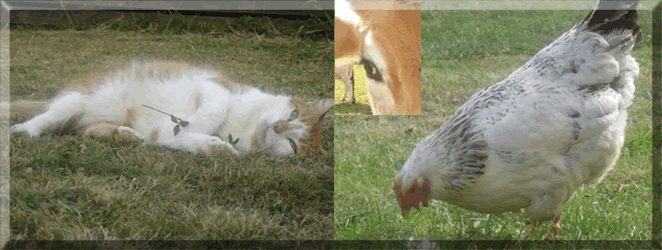
Trying to work out if something is inappropriate, objectionable or illegal, saw us searching for pictures of cats, chickens & cows!! As Yvonne so aptly put it Hornography & if it was a picture of a calf – even worse child hornography!!
Thanks to
Subscribe to:
Posts (Atom)